Everything You Need to Run Your Music Business
Built by music industry veterans who got tired of juggling spreadsheets, email threads, and sticky notes.
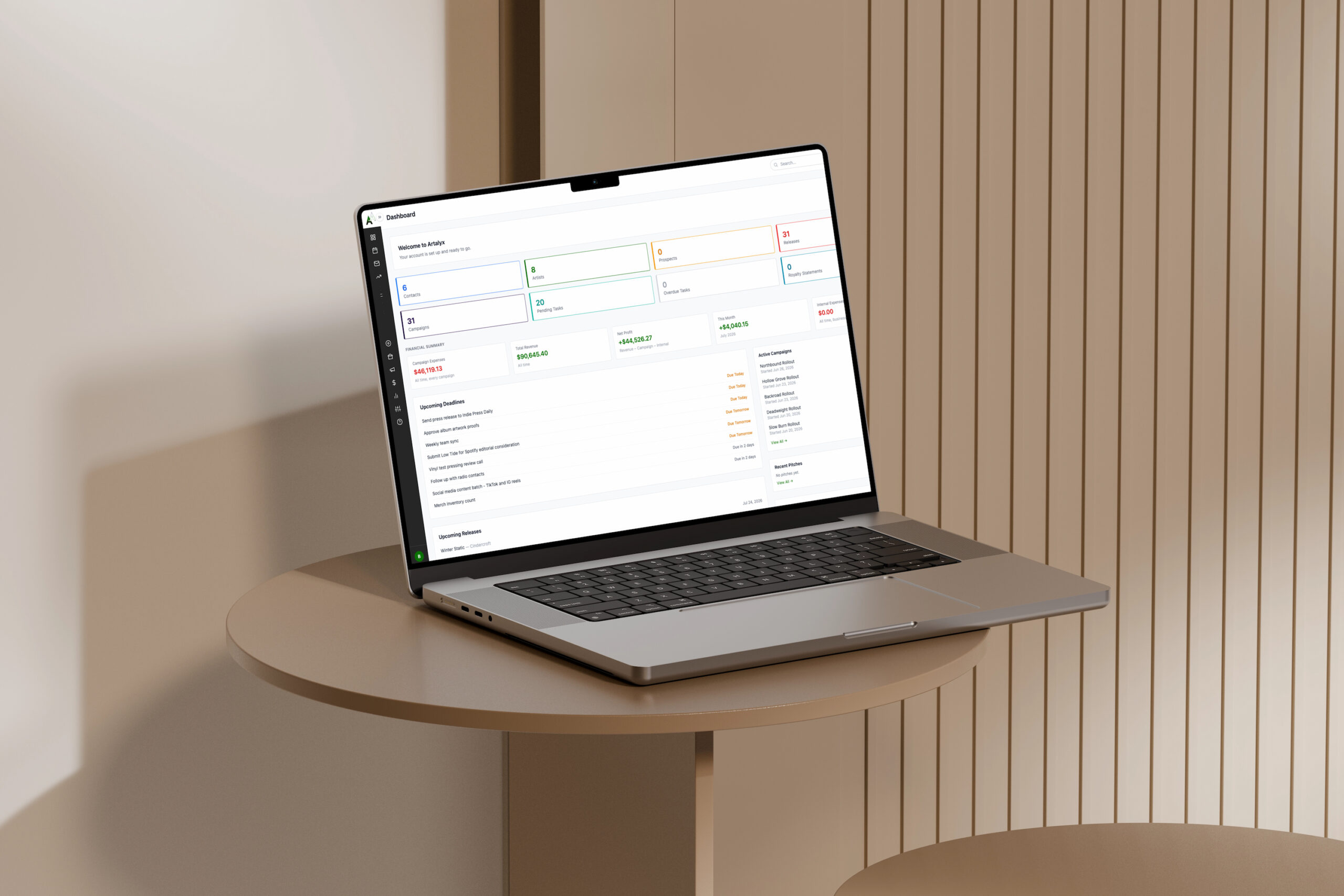
Plan Every Release with Military Precision
Stop losing track of deadlines, tasks, and who's responsible for what. Artalyx gives you complete campaign management from concept to completion.
Key Features:
Campaign Setup
- Link campaigns to artists and releases
- Set start and end dates with status tracking
- Custom campaign types (album release, single, tour, event)
- Optional automation: turn on auto-created tasks and every new campaign gets 6 standard promotional tasks pre-scheduled off the campaign start date, from tracking setup on day one through a performance review at day 30
Task Management
- Assign tasks to team members with due dates and priorities
- Recurring tasks (daily, weekly, monthly, yearly)
- Bulk edit multiple tasks at once
- Attach files and notes to any task
Budget Tracking
- Allocate budget across Marketing, Press, Distribution, and Production
- Log actual expenses against the campaign
- Monitor spending vs. budget in Financial Hub
Campaign Tracking Page
- See all active campaigns and their status at a glance
- Task completion rate per campaign
- Communications sent and media coverage received
"I'm planning a 3-month album campaign for one of my artists. I need to coordinate with the manufacturer, book a release show, pitch to 100 blogs, and track a $5,000 budget. Artalyx keeps it all organized in one place."
Build Your Network. Never Pitch the Wrong Person Twice.
Your industry contacts are your most valuable asset. Organize them with smart filtering, interaction history, and bulk import.
Key Features:
Contact Organization
- Filter by genre, region, outlet type, priority, and status
- Track every contact with full profile: outlet name, email, reach, submission guidelines
- Priority tiers (High, Medium, Low)
- Status tracking (Active, Inactive, Bounced)
Interaction History
- Full communications log per contact
- See every email sent, pitch submitted, and coverage received
- Last contact date always visible
- Never accidentally double-pitch
Import/Export
- Bulk import from CSV (Excel, Google Sheets)
- Flexible column mapping, your headers, not ours
- Export filtered contact lists
Contact Types
- Blogs & Webzines, Podcasts, Playlist Curators
- YouTube Channels, Radio Stations (College, Commercial, Internet)
- Influencers, Press & News Outlets, Venues, Distributors
- Sync Licensing Contacts, Booking Agents, Other Labels
"I need to pitch this shoegaze EP to every blog that covers shoegaze and is rated high priority. Artalyx finds them in seconds and I can email the whole list directly from the platform."
Send Professional Pitches. Track Results. Never Miss a Follow-Up.
Gmail OAuth means you send from your own address with full open and click tracking. No third-party footers. No app passwords. Just professional outreach.
Key Features:
Gmail OAuth Integration
- Secure login through Google, no password stored
- Sends from your actual Gmail address
- Appears in your Gmail Sent folder
- Recipients see YOUR email, not a service name
Email Templates
- Save reusable templates for common outreach scenarios
- Merge fields: contact name, outlet name, artist name, release title, and more
- Default email signature applies to all sends
Tracking & Analytics
- See who opened your email and when
- Track link clicks per contact
- Full engagement history per contact
- Export tracking data
Drafts & Scheduling
- Save in-progress emails as drafts and finish later
- Schedule emails to send at a specific future date and time
- Sends automatically without you being logged in
SMTP Option
- Use any SMTP provider if you prefer
- Fully separate from Gmail OAuth configuration
- Test connection and send test emails from Settings
"I'm pitching 200 blogs about an album release. I need to know who opened it, who clicked the stream link, and who needs a follow-up. Artalyx tracks every open and click automatically."
Manage Your Entire Roster from One Dashboard
Every artist gets a complete profile with contracts, releases, contact info, and social links. Everything about everyone in one searchable database.
Key Features:
Artist Profiles
- Bio, photo, genre, and status
- Social and streaming links: Spotify, Apple Music, Instagram, TikTok, YouTube, Bandcamp, and more
- Email, phone, and manager contact info
Contract Details
- Contract start and end dates
- Revenue split percentages
- Recoupment tracking
- Signing date
- Status badge (Active, Expiring Soon, Notice, Expired) with both in-app and email alerts as a contract approaches expiration, never get caught off guard by a renewal date
Release Tracking
- All releases linked to the artist record
- Catalog numbers, UPC/EAN, ISRC codes
- Format, distribution platforms, aggregator
- Credits and royalty split documentation
A&R Prospect Pipeline
- Track unsigned artists you're interested in
- Add notes from conversations
- Set follow-up reminders
- Convert prospects to signed artists
Artist Portal Access
- Give artists a login to view their own releases, royalty statements, and contracts
- They see only their own data, nothing else
"I've got 12 signed artists with different royalty rates and contract end dates. Artalyx keeps every deal organized and I can see at a glance which contracts are coming up for renewal."
Know Exactly Where Your Money Is
Track every dollar in and out. Revenue, expenses, and merch, all in one place, all feeding into your royalty calculations.
Key Features:
Revenue Tracking
- Log all income: streaming, physical sales, sync fees, advances
- Revenue type tagging (Digital or Physical) for correct royalty split application
- Item/Track field, specify exactly which song or product generated the income
- Link revenue entries to campaigns for accurate royalty calculations
Expense Tracking
- Log one-time and recurring expenses with category tagging
- Recurring frequency options: weekly, monthly, quarterly, yearly
- Link expenses to campaigns for budget vs. actual tracking
- Create a payment reminder task directly from any expense
Merch Manager
- Track merch items per artist (shirts, vinyl bundles, posters, etc.)
- Log revenue and production costs per item
- Net profit calculated automatically (gross revenue minus expenses)
- Merch profit flows into royalty statements using the configured merch split
Financial Dashboard
- Total revenue, total expenses, and net profit at a glance
- This month and this year summaries
- Recent expenses and revenue entries
"I need to know my net profit for the quarter before I calculate royalties. Financial Hub shows me total revenue, total expenses including merch costs, and net profit in seconds, then that data flows straight into my royalty statements."
Professional Royalty Statements in Minutes, Not Hours
Select an artist, choose the period, click Load Revenue. Artalyx builds a complete, printable royalty statement with your full letterhead in minutes.
Key Features:
Statement Workflow
- Create a statement for one artist covering one period
- Select campaigns and merch items to include
- Click Load Revenue Data, Artalyx pulls every qualifying entry automatically
- Review the full breakdown before saving: digital, physical, and merch line items with calculated splits
- Fill in recoupment and payment fields, then save
Per-Statement Split Overrides
- Global split defaults apply to all statements (set in Royalty Settings)
- Override digital, physical, and merch splits on any individual statement for artists with different deals
- Global settings for all other artists are unaffected
What Prints on Every Statement
- Your full label letterhead: logo, company name, legal name, address, phone, email, website
- STMT-YEAR-ID reference number
- Itemized revenue with Item/Track detail and revenue type badges
- Merch breakdown: gross revenue, expenses, net profit, artist/label share
- Recoupment section (advance, recouped to date, remaining balance)
- Payment details, dispute clause, payout threshold notice, payment terms, and signature block
Royalty Settings
- Configurable digital, physical, and merch split percentages
- Minimum payout threshold (default $25.00 USD)
- Payment terms (default Net 30) and dispute window (default 30 days)
- Custom disclaimer text for jurisdiction-specific legal language
Royalty Statements Report
- Filter by year and quarter (Q1-Q4 with quarterly due dates)
- Payment status badges: Paid, Unpaid, Partial
- Print individual statements or all statements for a period at once
- Clean, standalone print view, no dashboard clutter, just the statement
"End of quarter. I open each artist's statement, click Load Revenue Data, review the breakdown, add recoupment info, and print. Each statement has our full letterhead, every revenue line item the artist can verify, and all the legal terms. Professional statements in minutes, not hours."
See Your Entire Operation at a Glance
Visual calendar shows all tasks and deadlines. Google Calendar sync keeps your Artalyx schedule and your Google Calendar in lockstep.
Key Features:
Calendar Views
- Month, week, and day views
- Filter by artist, campaign, or type
- Color-coded by priority
Task Management
- Create tasks with priority, due date, and assignee
- Link tasks to campaigns, releases, artists, or contacts
- Recurring tasks: daily, weekly, bi-weekly, monthly, yearly, auto-extend forward on a rolling basis
- Bulk edit multiple tasks simultaneously
Google Calendar Sync
- Every task automatically syncs to Google Calendar the moment you save it
- No separate sync button to click, no manual export
- No re-authorization needed during normal use, tokens auto-refresh
- Same OAuth authorization covers both Gmail and Calendar
"I use Google Calendar for everything. With Artalyx sync, every task I create shows up there automatically and every change syncs. One calendar, no manual entry."
Know Exactly Where You're Getting Mentioned
Track every review, interview, playlist add, and feature. Measure campaign success with real data.
Key Features:
Coverage Logging
- Log reviews, interviews, features, and news mentions
- Rate sentiment (positive, neutral, negative, mixed)
- Add publication tier (A-list, B-list, C-list)
- Attach URLs and screenshots
Performance Metrics
- Total coverage by campaign
- Coverage by outlet tier
- Sentiment breakdown
Playlist Tracking
- Track Spotify, Apple Music, and YouTube playlist adds
- Log follower counts and submission status
Reporting
- Press Coverage report with date range and artist filters
- Export for clients or investors
"My client wants to know if the campaign was worth it. I show them 15 reviews, 3 A-list, 8 B-list, 4 C-list, all positive, plus 5 playlist adds. Numbers don't lie."
Plan Tours, Track Venues, Coordinate Logistics
Manage tour routing, venue relationships, and live event coordination all in one place.
Key Features:
Venue Database
- Store venue contacts, capacity, location, and tier
- Past show notes and payment terms
- Booking contact details
Tour Planning
- Create multi-date tour itineraries
- Link tours to campaigns
- Track expenses vs. guarantees
Show Tracking
- Attendance numbers, merch sales, door splits
- Per-show expense tracking
"Planning a 20-date tour. I need to track which venues we've played before, what the guarantees are, and whether we're staying profitable night by night. All in Artalyx."
Coordinate Physical and Digital Distribution
Track manufacturing orders, pressing plants, distribution deals, and physical inventory.
Key Features:
Manufacturer Management
- Store manufacturer contacts for CD, vinyl, and merch production
- Track orders, delivery dates, and costs
- Upload invoices and production specs
Distribution Tracking
- Digital distribution platforms (Spotify, Apple Music, etc.)
- Physical distribution (wholesale, consignment)
- Aggregator relationships tracked per release (DistroKid, CD Baby, TuneCore, and others)
- Territory management
Release Metadata
- Catalog numbers, UPC/EAN barcodes, ISRC codes per track
- Format tracking: Digital, CD, Vinyl, Cassette
- Distribution status per format
"I ordered 500 vinyl from a plant in Czech Republic and 1,000 CDs from Italy, distributing through 3 different companies. Artalyx tracks every order and every delivery date."
Own Your Fan List. Build It. Send to It. Keep It.
Manage your subscriber list and send professional newsletters and press releases with a real drag-and-drop builder, no HTML knowledge required, with full ownership of your fan data, exportable any time, never locked into someone else's platform.
Key Features:
Subscriber Management
- Add subscribers manually or import via CSV
- View all subscribers with subscription date and source
- Automatic unsubscribe handling, every send includes an unsubscribe link
- Export your full subscriber list at any time
- GDPR-compliant by design
Drag-and-Drop Builder
- Build the page as a stack of blocks: a full-width block, or a columns block in four layouts (2 equal columns, 1/3 + 2/3, 2/3 + 1/3, or 3 equal columns)
- Add Text, Image, or Button items to any block, and drag items between blocks to rearrange your layout freely
- Full text formatting on every text item: bold, italic, underline, links, text color, and font size
- Button items are a simple label and link, like "Listen Now" pointing at a streaming link, with a live preview, no HTML required to change where it goes
- Insert images from your Artist, Release, or Campaign's own photo library, upload new ones (they save back to that library automatically for reuse), or link to an image hosted elsewhere
- Set a background color for the whole newsletter or press release
- The canvas shows real width, real fonts, real spacing, and full-size images as you build, not a generic form
- Duplicate any block to copy it and everything inside it
- Preview shows the exact compiled email before you send, no surprises
- Autosaves every 30 seconds while you work
Templates
- 11 starting layouts covering New Release, Tour Announcement, Artist Signing, Music Video Release, Single Premiere, Partnership/Collaboration, Award/Nomination, and General News, plus 3 newsletter-style layouts including Upcoming Shows and Artist Spotlight
- Load a template and it drops right into the builder with your artist and release info already merged in
Sending
- Every send automatically includes the compliance footer required by law: your label name, mailing address, and a working unsubscribe link
- Send to Industry Contacts, Newsletter Subscribers, or both, each list keeps its own separate unsubscribe
- Personalize with merge fields
- Send a test email to yourself before sending to your list
- Send now, set a delay between sends, or schedule for later
"New release dropping Friday. I loaded the New Release template, dragged in the cover art, added a Listen Now button pointing at the Spotify link, picked our brand color for the background, and scheduled it for Thursday at 10am. No HTML, no code, just drag, drop, and send. My fan list is in Artalyx, fully exportable any time, not locked inside a third-party platform I'm paying monthly for."
Give Artists and Clients Real-Time Visibility
Artists and clients can log in to view their own data, releases, royalty statements, contracts, open tasks, and campaign performance, without any access to your admin.
Key Features:
Artist Portal Access
- Assign the Artist role to any user account on your team
- Artists see only their own releases, royalty statements, and contracts
- No access to other artists, contacts, finances, or settings
- Builds trust through transparency
No Extra Setup
- No additional setup required beyond assigning the user role
"My artists used to email me asking for their royalty statements and release dates. Now they just log into the portal and see everything themselves. Saves me time and makes the label look professional."
Thirteen Reports. Real Answers.
Know what's working, what's not, and where to invest your time and money.
Available Reports:
Financial Summary
- Revenue by source, expenses by category, profit/loss analysis, campaign ROI
Royalty Statements
- Filter by year and quarter, payment status badges, print controls
Revenue Analytics
- Revenue trended over time, broken down by source and by artist
Campaign Performance
- Budget vs. actual spending, task completion rates, media coverage secured
Artist Roster
- All artists and status, release counts, contract details, revenue generated
Catalog Health
- Release and metadata completeness across your catalog, at a glance
Release Timeline
- All releases by date, status breakdown, format distribution
Press Coverage
- Coverage by outlet type, pitch-to-coverage conversion, most successful outlets
Radio Airplay
- Station and market reporting, airplay trends, filter by date range and station type
Payout History
- Every royalty payout logged and searchable, by artist and by period
Advances & Recoupment
- Outstanding advance balances and recoupment progress, per artist
A&R Pipeline
- Prospective artists by status, follow-up schedules, submission tracking
Task Productivity
- Tasks completed vs. overdue, completion rates by team member, upcoming deadlines
"End of quarter I run the Financial Summary to see profit/loss, the Royalty Statements report to queue up payments, and the Campaign Performance report to see which campaigns drove the most coverage. All the data I need in one place."
Gmail Works Out of the Box. No Setup Required.
Artalyx is Google Verified. OAuth credentials are built directly into the platform. Most tools make you set up your own Google Cloud project first. We don't.
What This Means For You:
No Google Cloud Console Required
- No need to create a Google Cloud project
- No API keys to generate
- No Client ID or Client Secret to enter
- No app passwords or special Gmail settings
Setup in Four Steps
- Enter your Google email address in Settings → Google Services
- Select OAuth 2.0 and save
- Click Authorize with Google
- Sign in and grant permissions, done
What You Get
- Gmail API sending, reliable, no SMTP port blocking
- Automatic open and click tracking on every email sent
- Two-way Google Calendar sync for tasks and deadlines
- Tokens auto-refresh during normal use, no re-authorization needed
"I've set up Gmail integrations in other tools before. All of them wanted me to create a Google Cloud project, enable APIs, set up OAuth credentials, 45 minutes of work before sending a single email. Artalyx took four clicks."
STILL HAVE QUESTIONS?
Browse our Documentation or Contact Us